Using the Sherlock on Kali Linux

The **Sherlock** tool is a powerful open-source intelligence (OSINT) tool used to find usernames across hundreds of social networks. It is widely used by cybersecurity professionals and researchers for reconnaissance during penetration testing or for digital forensics.
⚠️ Important Legal and Ethical Disclaimer
This tool is for educational and ethical purposes only. Unauthorized surveillance or harassment of individuals is a serious violation of privacy and may be illegal. Always obtain explicit permission before using this tool on a target, and use it responsibly.
Step 1: Install the Sherlock Tool
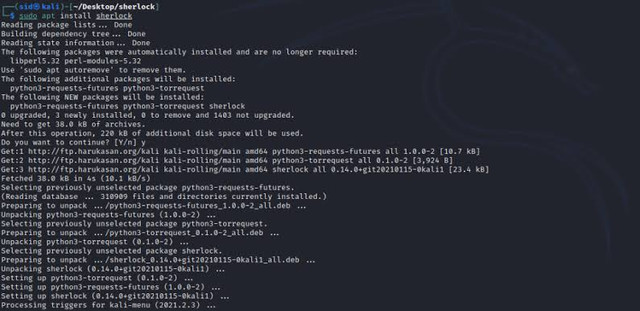
Sherlock is a Python-based tool that you can install easily on Kali Linux. It is not pre-installed, so you will need to get it from its official GitHub repository. First, ensure your system is updated.
sudo apt update && sudo apt upgradeNext, install Git and the Python 3 `pip` package manager if they are not already on your system.
sudo apt install git python3 python3-pipNow, clone the Sherlock repository from GitHub and navigate into its directory.
git clone https://github.com/sherlock-project/sherlock.git
cd sherlock
Finally, install the necessary Python dependencies for the tool to run.
pip3 install -r requirements.txtStep 2: Basic Usage

Using Sherlock is very straightforward. You only need one command to start searching for a username. This command will check the username across a vast number of websites.
python3 sherlock.py [username]For example, to find the username "john.doe" across social media sites, you would run:
python3 sherlock.py john.doeThe tool will go through each site and tell you whether the username exists or not, providing a link to the profile if it finds one. This process can take a few minutes depending on the number of sites it checks.
Step 3: Advanced Options
Sherlock comes with several useful options to customize your search. You can see all available options by using the help flag.
python3 sherlock.py --helpSome of the most common options include:
- `--folderoutput`: Saves the results into a text file in a specified folder.
- `--timeout`: Changes the number of seconds before a search for a username times out.
- `--site`: Searches only on a specific website.
For example, to search for a username and save the output to a file, you would run:
python3 sherlock.py john.doe --folderoutput /root/sherlock_resultsConclusion
Sherlock is an invaluable tool for ethical hackers and security researchers. It automates the reconnaissance phase of a security assessment, allowing you to quickly gather publicly available information on a target. Remember that **responsible use** is key; always ensure you have a legal and ethical reason for your search.
Comments